8 Ergonomic Home Office Setup Essentials to Prevent Back Pain

Learn eight ergonomic home office essentials that can reduce back pain, improve posture, and help you stay comfortable and productive during long workdays at home.

The ache started before lunch.

At first, I ignored it. A little stiffness between my shoulders seemed harmless. By mid-afternoon, my lower back felt like it had aged twenty years. By evening, I was stretching on the living room floor while my daughter asked why I was lying there like a starfish.

If you work from home, this probably sounds familiar.

Many of us build home offices around convenience instead of comfort. We grab the nearest chair, hunch over a laptop, and promise ourselves we’ll fix the setup later. Weeks turn into months. Suddenly, back pain becomes part of the daily routine.

As a freelancer, business owner, blogger, wife, and mom, I spend long hours at my desk. Through plenty of trial, error, and a few regrettable furniture purchases, I learned that a good workspace is not about looking impressive. It is about protecting your body.

If you are searching for 8 ergonomic home office setup essentials to prevent back pain, these practical upgrades can make a huge difference in your comfort and productivity.

Why Ergonomics Matter More Than Most People Realize

Back pain rarely arrives all at once.

It sneaks in gradually.

One day your neck feels tight. The next week your shoulders ache. Eventually, even sitting through a meeting becomes uncomfortable.

The good news is that small ergonomic improvements often create significant results. You do not need a fancy corporate office. You simply need a workspace designed to support your body instead of fighting against it.

1. Invest in a Proper Ergonomic Chair

https://images.openai.com/static-rsc-4/TPe-XqGo95tZRugy7OJUb9sXow1cKRkPzVRKuLbTFgs9C9E1iirf95LliBJge45XP4cj0rBcjZPLjaNnjS-4qfW2_T1nI5MCXO8NGO3oEmXqI2O6HdRIAMU1jq-WExucDa-GYKU3AhKGVoblg1uqd9GxXNNDaUvTzZqbk-_7CnR5jRJZFKDJVTZK1RStEZUw?purpose=fullsize
https://images.openai.com/static-rsc-4/AOzt--vx80NzMZIJGmNrVh5Jg_-EG5FInQTkBk2FEDCJ-vgX_ZYjIgvBv_7OKKf7g5-B6ARxW3ZtpDdLQUKxr4kO0giuSTHMgoRMTMp19W66M1fnCFgLAgBtNGEKsJrzzR1E-GeaZS0piYlQvM27AOHN1QMPW_Zwy0ACp6ON97wZTSOQ92Wpaf2WzvtARgjC?purpose=fullsize

If your chair feels like punishment after two hours, it is probably time for an upgrade.

For years, I used a dining chair because it looked nice. My back strongly disagreed with that decision.

An ergonomic chair supports your spine, encourages better posture, and reduces pressure on your lower back.

Features worth looking for

  • Adjustable seat height
  • Lumbar support
  • Adjustable armrests
  • Breathable material
  • Reclining function

A good chair may seem expensive until you compare it to the cost of chronic discomfort.

Takeaway: Your chair is the foundation of an ergonomic home office setup.

2. Position Your Monitor at Eye Level

https://images.openai.com/static-rsc-4/Vj4oWUgI12SOK9iKseJQVacj1uysdwaqYbqkyl1JLKXs05gaJOmSdZhkmFuSVUVuHfdTGY_6EKFQT6LpXuwPNkfsJvO4VyRZACVc5Bf32rJ5udHDcbgHKaPpZtc4zu9tlCr3QTL6wDVpO-j6VsmhN19qt-xhxRMyxnqwYx6JwC5A8EL9nq0L1cRxZ0gcQNJV?purpose=fullsize
https://images.openai.com/static-rsc-4/8WyowZnTEbyp4C9QKKN6LuzplWHUlHUgMR6DtqUjxwyDcvTUdnDxQLXWc_J_EZY-QBfniCCiDFJntTcwUmsJ7EXCTa48nIgReoRJiyh0DF6swuOLKJlzuyqOkISjXttAAWIhJqKYAuD1UvHEWI0xE-tfgAKkXvMQ_DHdwxRCUoR5JPwXs8OE4f7N79CMuzMU?purpose=fullsize

Laptop screens are convenient.

They are also excellent at encouraging terrible posture.

When your monitor sits too low, your head naturally tilts forward. Over time, this places extra strain on your neck, shoulders, and upper back.

I noticed a dramatic improvement after raising my monitor with a simple stand.

Ideal monitor placement

  • Top of screen at eye level
  • Screen about an arm’s length away
  • Directly centered in front of you
  • Minimal glare from windows

Your neck should remain neutral while working.

Takeaway: Eye-level screens help prevent neck and upper back strain.

3. Use a Height-Appropriate Desk

https://images.openai.com/static-rsc-4/DBiz_SoxG4_C8D7tVNJksGsORk5BlWcWMUrN-SbwxJa2prYrG9M4g0bYEwgfdqwwdmgxr4I0OM_OgmZIlQqcv1_MlxmjoobtNDeFcf2olPYFTCb7mwvLc_Xhwn-EdfGO16LgrB8mHCyefLU1q-iU3NoTf8lhllvvjG2w05glebkkDt-s87fEcC8bOBycbtlx?purpose=fullsize
https://images.openai.com/static-rsc-4/iTBS74RVq5yKPzhlsIjT_JyS_r5wR9AI2Zs_oTXh8To3FyHGXFKTrC2noY7a7axT7r0ByGTs0rOS_dmldoMqKJ0shDcfC01M-YnakhVWHSCSG1sr_38WpoOJvZvQvHyoEdluO2qwD0D0PYGz2pJQgWpLYuARrwBeisLIB0vmzxxxm-s1rtuNwkqkbuvHEfVP?purpose=fullsize
https://images.openai.com/static-rsc-4/GupWtrCrkfmHhI-XIGYJxdVtG4w8z_pwx4O8AW1l6F_7udhy5Qmh__-8Mu9rJ-txMCc78fVSE9oGITtyy1vfay8XOADCo0TQQ7GyJoMoqaVd796JMbmr4Z_aCdxNX0lJOiWdZeqh_p-epZrwtV8ugfKUKIFvmxrMBb2sdum0Ryx_0VF5wcHj0hHWfuT7HnXJ?purpose=fullsize

Even the best chair struggles if your desk height is wrong.

Your arms should rest comfortably while typing. If your shoulders constantly creep upward, your desk may be too high.

If your wrists bend awkwardly, your desk may be too low.

Signs your desk height needs adjustment

  • Shoulder tension
  • Wrist discomfort
  • Frequent slouching
  • Leaning forward constantly

Many people discover that a standing desk provides additional flexibility throughout the day.

Takeaway: Proper desk height supports healthy posture from head to toe.

4. Add a Laptop Stand and External Keyboard

https://images.openai.com/static-rsc-4/PH-o68wEtTWUpQ8BxwK2w9rw8a61EwhUHCkZOXTF4hvVO7nDrf2Bm7W6S4iUyRTeHdJWc-Cs148h6-tLSQdrx0KlsLgY5L3hNSl15EHuQiA0NqVU0KP-pPaPDTHAE-1a-SJMbu0jwVaW6K1gB13CXCreyi_rclBVw_Q6gDsW5dUJ1XslO2W3lJocg12aLUBm?purpose=fullsize
https://images.openai.com/static-rsc-4/1Kqo_liSq_YVdNUGeAZusbAhrc2ZSrUllmKtpyLx_4GzOmhsPSc36QwYc3q43006sy0qnpvoRp5qB90KOs7f9qp3kjP55y9QGksQdDrdLcZQuHS7h7LMQaRpPBVqmVl291P8bHFMnbaF-h00rTa-K4j_b6wNMjxED0KAxXyvP_mFS0FMWlykUUVH9lp_6blO?purpose=fullsize
https://images.openai.com/static-rsc-4/54cuPgmanboyaQARUV5zxsYE354MnDTbYIpiKy6y76tuDf3v2vtBbb1kf_KGlSc0693PC2m54_cxMWXzFFrdNmcCfggaIY3t0ngz1WZ8aUOTAjtFHZEL1BNf7zkbe7lAqZy2ri3z9U6sMmO8DAM4MlSvJzSg2gOXbvNpWmJ_Fp9hi_A3E_E-wzjT3sl_ctRH?purpose=fullsize

This upgrade completely changed my daily comfort.

Before using a laptop stand, I spent hours looking down at my screen. My posture looked suspiciously similar to a turtle attempting office work.

A laptop stand raises the screen to eye level. An external keyboard allows your arms to remain comfortable.

Benefits of this combination

  1. Better neck alignment
  2. Improved shoulder position
  3. Reduced upper back strain
  4. More comfortable typing

FYI, this is one of the most affordable ergonomic upgrades available.

Takeaway: A laptop stand and keyboard create a healthier workstation instantly.

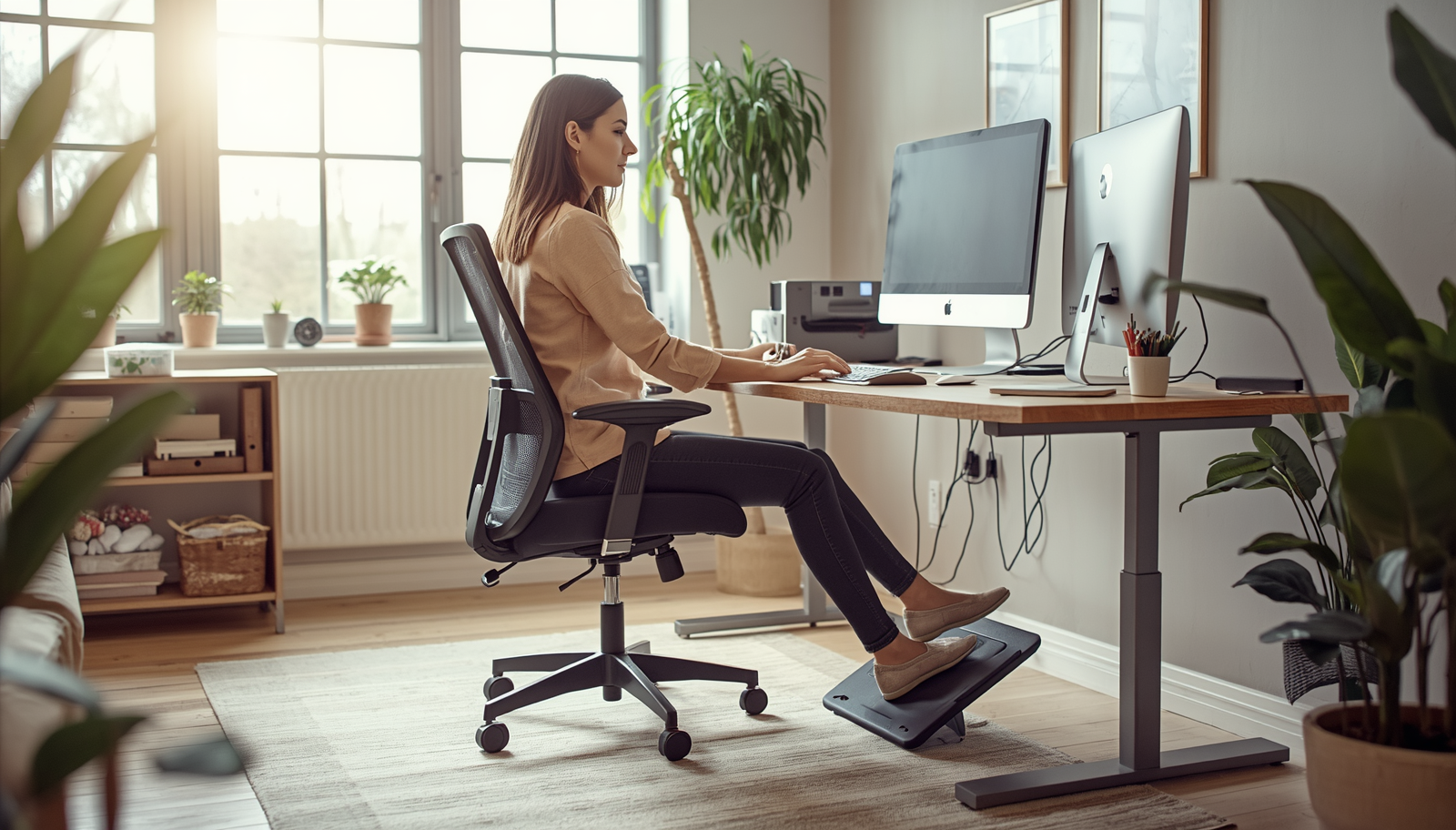
5. Support Your Feet Properly

https://images.openai.com/static-rsc-4/-kG-bntcjkpCGOCOpvvfFKW_l0DU9mhIPe6RhTPgGf7IuOvMutfgKs3A3UqV6lMPvdaJynZES2gL-ctOp5SQJZ_gwY8WDGAMj0fT0vn1_8mzlak1YCvKsPOxtGYUyKFSpx5vOkwZhtzDMDiKE04TmikNjVjhJV5pXc6_XKcV6t_iZyVo3ZYT3_ixsS7BCsye?purpose=fullsize
https://images.openai.com/static-rsc-4/UEYEB9aRJFIgbLmbRzMgvZzvj5Ti1JA4bBgWH2FqZbMtC2_wHg_4dfRxsF5KZgiZniq8sfJCYcVKC8j2Td60KjfcpoZRBARkbIwquoe_QwAoj6OELsX3-lhGqTE1MmJD8Xy9v0uuBOPjy2pOapQbMccGV0kfojKSirU4VcK9r8XelXSPsMPRLa6myCaZS_EN?purpose=fullsize
https://images.openai.com/static-rsc-4/v9uhNZmmchXs7p3cYHnbT63PAU4g-BgK6QpubyjlLfhJm2PZVbt193ysT1gzsaW7Q01fMryPlXB9O3bCX6WJ5LScF-Z8qwsu_QRT33jMu_5j_9yHMbkncXtii7lzBWdg-fJu5id-CAMyw5mttw7uZ5MnheJrJgUDfd1R2ACdpGogTCboHGW_ZAunrcuRpO-a?purpose=fullsize

Feet rarely receive much attention during ergonomic discussions.

They should.

Your feet help stabilize your entire sitting posture. If they dangle awkwardly or rest unevenly, your lower back often compensates.

I learned this after lowering my chair to fit my desk and realizing my feet no longer touched the floor comfortably.

Foot positioning guidelines

  • Feet flat on the floor
  • Knees at roughly ninety degrees
  • Weight distributed evenly
  • Footrest if necessary

Small adjustments can have surprisingly large effects.

Takeaway: Proper foot support helps maintain spinal alignment.

6. Improve Lighting to Reduce Posture Problems

https://images.openai.com/static-rsc-4/giY3Q8oJ4xb7Tr-81LiFBmLE18H6OkpBHDLZHaHILtRHXVE7mdu1RTrsyHPCNchklblqROi7QJxdWWtaZPOGnQnTRHutdLX-e9JGftpS1HXTqL8_G6ax3v_0hukGp0oxFx_gi5-G9Vv8ZIWG6FWidDQhWV-e1gNo3jVkGDq5lWbqibavCVd4kJ2yjVS-t37U?purpose=fullsize
https://images.openai.com/static-rsc-4/00z6EPxA2pyDdMEAwlXntBFCYS5CU6phMmI-NxQcNvNO--BgXg5MAyDwKVvFLIad8SHEzMJ6X6a4q4I2TEWluG1qTED6o3_3j5Dg8dvVO9Y__SV5X_Em9a2_zcKtI_bkdX2BnZnNRA1BWCTMLBEV5DY41b1C0PRuMiMNV1tn1_9vfxy4IvlQImSJhYYN-Ef0?purpose=fullsize
https://images.openai.com/static-rsc-4/pZudkmgqgk8xOWAUcPh4yYP1VLPQ9GqlAVGqq-ILOotH5gFvFMsCcZ_mi2aon2pGEQdXVLpNr27mTIDePXhtCpcdlFVhTjfRWqZ9HJU164FMbMYkgD4-x_Y0FBxJUc9SkJ5IgkgIVyWvuX0GYcJ7Nhb9I7Po0N4UWl8OIEThbmE50bTdIGn6rSfqoiJQHC5h?purpose=fullsize

Lighting affects more than visibility.

Poor lighting often causes people to lean forward, squint, and adopt awkward positions while working.

Natural light remains my favorite solution whenever possible. It improves comfort and creates a more pleasant environment.

When natural light is limited, a quality desk lamp can help maintain proper posture.

Good lighting habits

  • Position desk near natural light
  • Reduce screen glare
  • Use task lighting when needed
  • Avoid overly harsh lighting

Your eyes and back often work together more than you realize.

Takeaway: Better lighting encourages healthier working positions.

7. Use a Standing Desk or Standing Schedule

https://images.openai.com/static-rsc-4/Zp1OWcSMDkNznDM9NsofqaR39I7FT_K5h7EbR5A21atJtc_UDJ6B_2h3Iu1EWBf4amU8AiehO1Tx2oiJZDH5-YmuF7793VIaK2sYtoCb650f5zMmx20ba1t9F_LFeZPVMDuX2burEXE3DKlrg6YfuAo2Aun7XZK-BJwC1kZVzTI-djY0DH6vPGX0yEKul49K?purpose=fullsize
https://images.openai.com/static-rsc-4/xqR5NbWpjpSKSi2HCqm2R1vEXLbF-mr7Y_Dxze4nkujbR8n-nC2jeugKAl4ZL6dK6R4COU7LFbz_Fb_ZNkenERBALNPNmFoIvuhTVGB2DvRE2b0KeMv17Vb1eNNwSVgvUESZ_QF3b4gF4adoQ6jtT2dwqsZYN0Y4ilgTCmdswFZuL-m-CMjsAMNiH4Xo1PL4?purpose=fullsize
https://images.openai.com/static-rsc-4/sbQuMk28gwxpro55kO9rhSgiNAArYEZXll10CPxN3bi1-r-_aO78BfL8rUd1WuEnla7bf5w9j2RiI5Rks_UBs8uz11G4GT2hdWMnFs58wQrwIp2oZ9E1PZ0HEp3VQnJHnYgHIWF0T4aJyiBwO1vOJ5Bj0Izpj9CgDXOqC0pgBIGX9H4WE_U6orSvW60roWBJ?purpose=fullsize

Even perfect sitting posture has limits.

The human body likes movement.

After switching to a sit-stand routine, I noticed less stiffness throughout the day. My energy improved too.

You do not need to stand all day. In fact, that can create new issues.

Simple standing schedule

  • Sit for 45 to 60 minutes
  • Stand for 15 to 20 minutes
  • Walk briefly every hour

Consistency matters more than perfection.

IMO, movement remains one of the most overlooked ergonomic tools available.

Takeaway: Alternating between sitting and standing reduces prolonged stress on the body.

8. Create Space for Movement

https://images.openai.com/static-rsc-4/NVRqag0j3ctYYR9Th8ZIyUU84ji9GSgfoeEHtK6Lx4_a-Ci4Qy3byZWKz-HtazYLung_OYso-eXhDV_UAf2YEEEy8Ss89SyIUaaIu1cboKr0DrlfP3KixemmQOvzYvxIzEdJeLF7Lf44pP3rbWwJkOh7eZSh0IOgArMI08l-gsqAumUdtIs7uuzpf6Qo3Bqx?purpose=fullsize
https://images.openai.com/static-rsc-4/GzVyj1KFRMP9Uv9t5bG4Wq0TjR018wxToLX91SZxNL7MUxo7KPzhl3MUxgQCxHLqvYaMOuXR8PX-LzX0qFmGda30lzfSgl7LPvsx6nFLgf2_QfTYVPSxqJodM8Ov9kQ9PMDOoDbTCV_UqftNCgO0sikBQxpCVMcA66_8bXcq5q_qdYlcBQQl-mTtAaNbyYr3?purpose=fullsize
https://images.openai.com/static-rsc-4/vu5_S9_Ixbeu65LpKr71RjznajAKQsyWM9srwkaqc_d_X5TSbrGagrRCUPKdDtwEZvkzptClwAcP7cnnxTYcVtMj04-s-l8Ln49BV8D7kNbVXiYjpFLnf0mr45kRsEZbfZmMttKSWakkkZ5NgNzrx3nrSuyjU1h5AijayBKwM_XLcZA2m8yAbUvuog_hhbB3?purpose=fullsize

The most ergonomic chair in the world cannot replace movement.

I learned this lesson after upgrading my entire office yet still feeling stiff some afternoons.

The missing ingredient was simple.

I needed to move more.

Easy movement habits

  • Stretch between meetings
  • Walk while taking phone calls
  • Stand during short tasks
  • Rotate shoulders regularly
  • Take brief movement breaks

My daughter occasionally joins these stretching breaks. She treats them like an Olympic event. I mostly try not to pull a muscle.

Takeaway: Movement remains essential for preventing stiffness and discomfort.

Common Ergonomic Mistakes That Cause Back Pain

Many home office workers unknowingly create problems through everyday habits.

Working from the couch

Comfortable for thirty minutes.

Regrettable after three hours.

Using laptops without elevation

This encourages neck strain and slouching.

Ignoring posture

Even excellent equipment requires good habits.

Sitting for too long

Remaining stationary creates stiffness and fatigue.

Prioritizing aesthetics over comfort

Beautiful workspaces should still support your body.

Avoiding these mistakes often improves comfort faster than buying expensive equipment.

How to Know Your Setup Is Working

You may notice improvements gradually.

Some signs include:

  • Less neck tension
  • Reduced shoulder tightness
  • Fewer headaches
  • Better posture awareness
  • Improved focus
  • Less lower back discomfort

The goal is not achieving perfect posture every second.

The goal is creating a workspace that makes healthy positioning easier.

Final Thoughts

Building an ergonomic home office does not require turning your workspace into a futuristic command center.

Small changes often create the biggest results.

Start with the basics. Improve your chair. Raise your screen. Support your feet. Move regularly throughout the day.

Most importantly, listen to your body. Discomfort is valuable feedback, not something to ignore.

A productive workspace should help you do your best work without leaving you feeling like you wrestled a bear by the end of the day. Your back deserves better, and thankfully, a few thoughtful adjustments can make a world of difference.

Avatar photo
Lyn Nguyen